![memtime-light-2x.png.png]](https://knowledgebase.memtime.com/hs-fs/hubfs/memtime-light-2x.png.png?height=40&name=memtime-light-2x.png.png)
You can find more information about CMap's plans here: 🔗 CMap Plans
1. Required CMap plan (Enterprise)
Due to recent API and security changes, CMap restricts OAuth client creation to Enterprise tenants only.
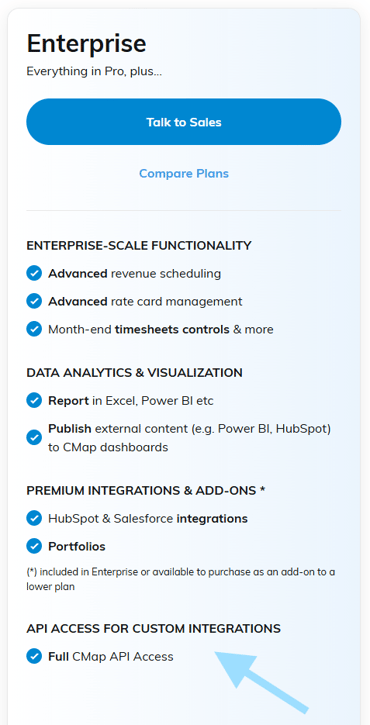
This means:
-
The integration only works if your CMap account is on an Enterprise plan
- Only Enterprise customers can create their own OAuth clients
Before continuing, please confirm with your CMap administrator that your account is an Enterprise tenant.
2. Create an OAuth Client in CMap
Once the correct plan is confirmed, your CMap administrator must create a new OAuth client.
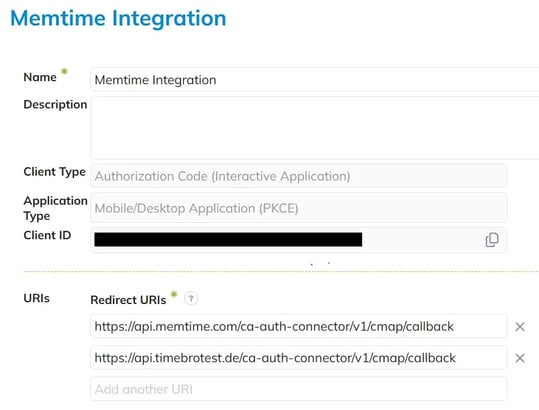
This can be done in Application Management in CMap with the following configuration:
- Name: Memtime Integration
- Client Type: Authorization Code Flow
- Application Type: Desktop / Mobile Application (PKCE)
- Redirect URIs (both need to be added):
https://api.timebrotest.de/ca-auth-connector/v1/cmap/callback

https://api.memtime.com/ca-auth-connector/v1/cmap/callback
3. Share Client ID with Memtime Support
After the OAuth client has been created:
- Please contact Memtime Support
- Share the Client ID of the newly created OAuth client
Important:
- The integration will not work immediately after creation
- Memtime must first configure the integration using your Client ID
- Once this step is completed, the integration becomes fully functional
Result
After completing all three steps, you will be able to connect and use CMap with Memtime.
Support
Need help with the article or have any questions? Reach out to us anytime at: