![memtime-light-2x.png.png]](https://knowledgebase.memtime.com/hs-fs/hubfs/memtime-light-2x.png.png?height=40&name=memtime-light-2x.png.png)
To adjust your settings for automatic comments in Memtime, you can do the following:
1. Open Memtime, click on the Menu Icon (☰) → Settings.
2. Scroll down until you see the section Time Entries.
Here, you can adjust your settings for automatic comments.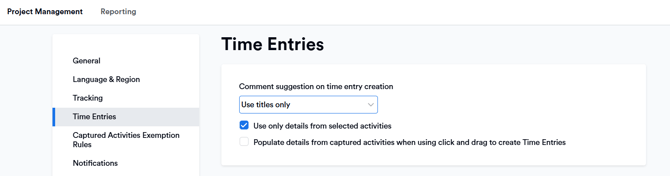
The comment suggestion on time entry creation can:
-
Be off (leaves the comment field empty)
-
Use only titles (creates shorter comments based on the title)
-
Use item details (creates more detailed comments)
Additionally, the option Use only details from selected activities affects how activity details are applied:
- Enabled: Memtime uses only the details from the activity you selected and ignores any other activities that occurred during the same time frame (such as calendar events).
- Disabled: Memtime includes details from all activities that took place within the selected time frame.
When Populate details from captured activities is enabled, time entries created using the click-and-drag method will automatically include these details as comments.
This article can help users who connect Memtime with project management tools that allow to create entries with a certain character limit only, like DATEV, because you can still have automatic comments based on titles, and not exceed the limit.