![memtime-light-2x.png.png]](https://knowledgebase.memtime.com/hs-fs/hubfs/memtime-light-2x.png.png?height=40&name=memtime-light-2x.png.png)
Only a Memtime Admin User can perform this step. Users with standard Memtime access (App Users) will not be able to view or configure these settings.
Before starting
For optimal use of Memtime with DATEV in a team, we recommend authenticating a Service User in Memtime for API access.
Before creating a Service User in DATEV and setting up the required permissions, we recommend authenticating an existing DATEV user with Main Admin rights.
This is the recommended way to authenticate the Service User in Memtime.
How to authenticate a Service User
- Open Memtime.
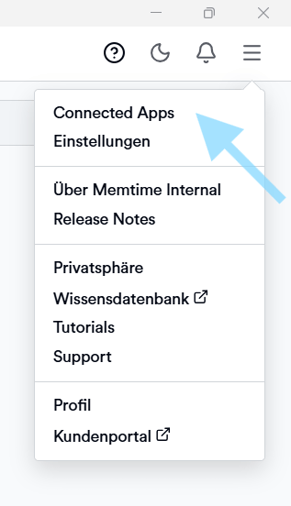
- Click on the menu (☰) and select Connected Apps.
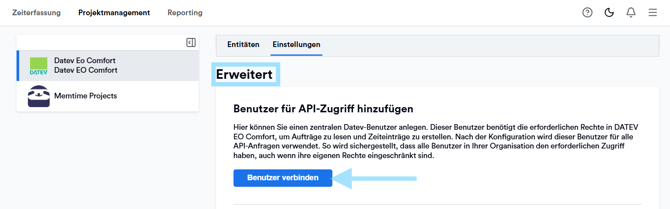
- Scroll down, and click on Connect User in the section of Advanced Settings.
- Enter the credentials of the Service User from DATEV.
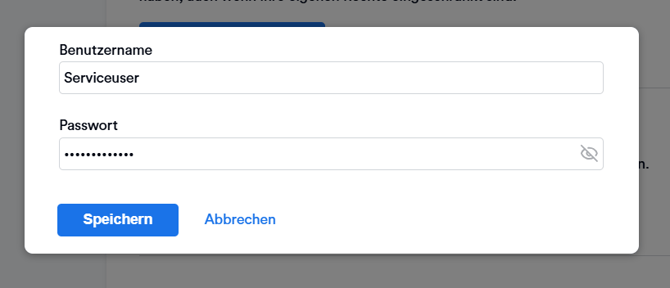
The service user name usually has a domain that should be prepended.
How to find the credentials for the Service User
Recommended Option
We recommend using the credentials of an existing user with Main Admin rights in DATEV.
To enter the credentials in your Memtime app, please contact the user in your team who has these permissions in DATEV and ask them to authenticate as the Service User.
Please try the recommended authentication option for the Service User first before considering the next option.
Alternative Option
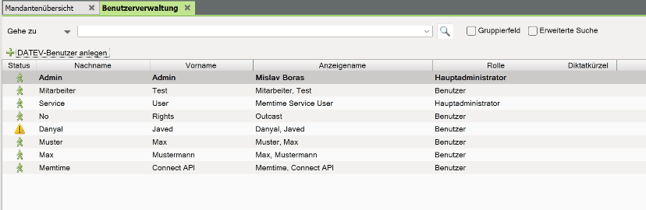
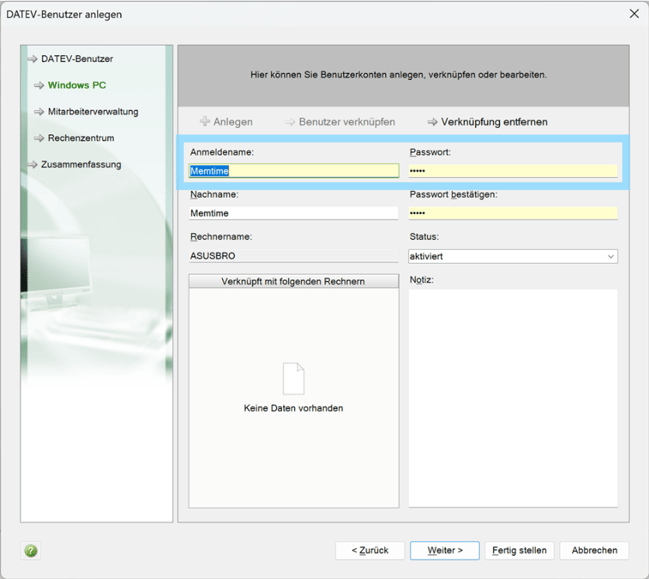
If your IT team has created a new Service User for the Memtime app, the DATEV Service User username and password will be visible under:
DATEV → User Management → Service User → Windows PC
Result
After successful authentication, Memtime will be able to use the permissions of the Service User for any Memtime user who might not have all the necessary rights over their own DATEV user.
After this step was completed by a Memtime Admin user, all other Memtime App users should follow this article: