![memtime-light-2x.png.png]](https://knowledgebase.memtime.com/hs-fs/hubfs/memtime-light-2x.png.png?height=40&name=memtime-light-2x.png.png)
The NFON integration is available with the Premium plan.
What You Need
- NFON connected and authenticated in Memtime (see How to connect Memtime to NFON)
- AI transcription enabled on your NFON account (contact your NFON administrator if unsure)
Step 1: Activate Transcription During a Call
AI summaries are generated by NFON during the call itself — Memtime picks them up automatically afterwards.
- During an active call, the caller presses the transcription button in the NFON interface to start recording.
- The called party receives an automated consent message (in German) and must press 1 to agree to being transcribed.
- NFON records the transcript for the duration of the call.
- After approximately 3 minutes of conversation, NFON's AI generates a summary and makes it available via the API.
On Memtime's next sync cycle, the summary appears automatically on the call entry — no manual refresh needed.
Both parties must actively participate in the consent step. If the called party does not press 1, no transcript is recorded and no summary is generated.
Step 2: Enable AI Summaries in Memtime
- In Memtime, go to Menu (≡) → Connected Apps → NFON.
- Toggle Show AI Summary on.
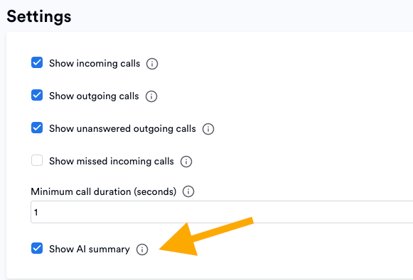
When enabled, summaries appear on the call entry in your timeline. When disabled, summaries are hidden from call entries and are also excluded when converting a call to a time entry.
Step 3: Use the Summary When Creating a Time Entry
When you convert a call to a time entry, the AI summary is automatically pre-filled into the comments field (for connected apps that support comments). You can edit or delete it before saving.
Troubleshooting: Summaries Not Showing
Summaries take approximately 3 minutes after the call ends to be generated by NFON. Memtime picks them up on the next sync. Wait a few minutes and navigate away from the date and back to trigger a fresh sync.
"One or more call summaries could not be decrypted"
Memtime encrypts all AI summaries stored locally to comply with GDPR. Each user has a unique encryption key stored in their local credentials file. If that file is deleted or corrupted, existing summaries can no longer be decrypted and will be hidden.
To recover:
- Go to Menu (≡) → Connected Apps → NFON.
- Click Reset Encryption Key.

This will delete all locally stored (unreadable) summaries, generate a new encryption key, and re-fetch summaries from NFON on the next sync. Summaries will reappear automatically — no further action needed.
The encryption key is stored only on your device and is never sent to Memtime's servers. Resetting it is the only recovery path if the key is lost.
Support
Need help with the article or have any questions? Reach out to us anytime at:
🔗 support@memtime.com