![memtime-light-2x.png.png]](https://knowledgebase.memtime.com/hs-fs/hubfs/memtime-light-2x.png.png?height=40&name=memtime-light-2x.png.png)
Any Memtime app user can perform this step, regardless of whether you have only Memtime user permissions or also Memtime administrator permissions.
- Open Memtime.
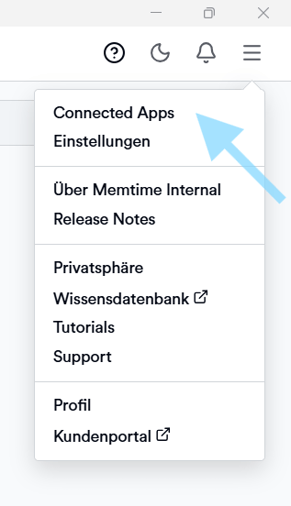
- Click on the menu (☰) and select Connected Apps.
- Click on Authenticate.
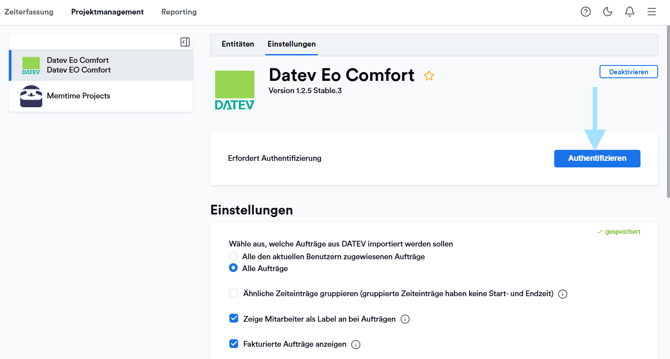
- Your username will be filled in automatically. Please check that it is correct.
Enter your Windows password and confirm.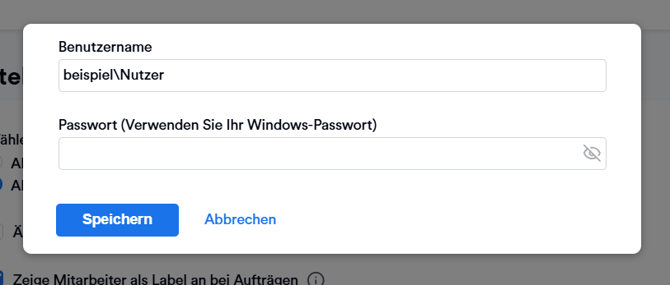
Result
After successful authentication, Memtime will be connected to your DATEV user and should import your data from DATEV.
Note
- Only data you have the appropriate permissions for via the DATEV API will be imported.
- If authentication does not work, please check with your IT whether a Memtime Service User has been set up (see article: 🔗 Set up a Service User for Memtime).
If none of the above steps help, including the article for setting up a Service User, but you are authenticated in Memtime, you can check out the following articles for more help: