![memtime-light-2x.png.png]](https://knowledgebase.memtime.com/hs-fs/hubfs/memtime-light-2x.png.png?height=40&name=memtime-light-2x.png.png)
In DATEV, booking time entries on orders with the status "work completed" is still possible if your DATEV settings allow it.
For example, you can set your settings to allow booking time on orders up to the status "invoiced" or "work completed", which then allows such time entries in DATEV directly.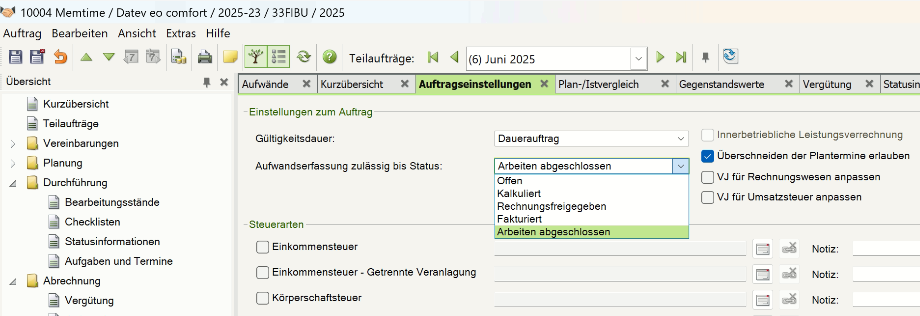
What's important to know is that Memtime is a tool that integrates with DATEV over the DATEV API.
Currently, regardless of the existing DATEV settings, the DATEV API doesn't retrieve any clients with all orders marked as "work completed". However, once DATEV updates its API, Memtime and other integrations will be able to replicate the same behavior you have in DATEV.
In the meantime, this is the alternative solution you can use:
1. Open DATEV and go to the order that you want to book time on.
Find the setting and deactivate the status "work completed".

2. Go to Memtime and open the Project Management tab.
Refresh the list once and wait for it to complete the refresh.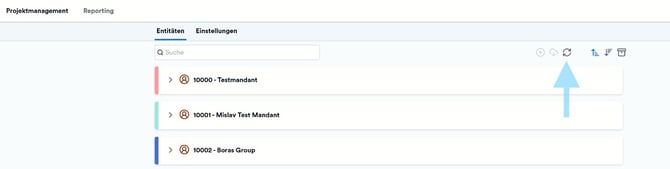
Note: Orders and sub-orders without names are automatically filtered out by Memtime and are not displayed. Please ensure that all DATEV orders and sub-orders have a name so that they can be displayed and used in Memtime.
3. Go to the Time Tracking tab and check if all your clients and orders are now visible in Memtime.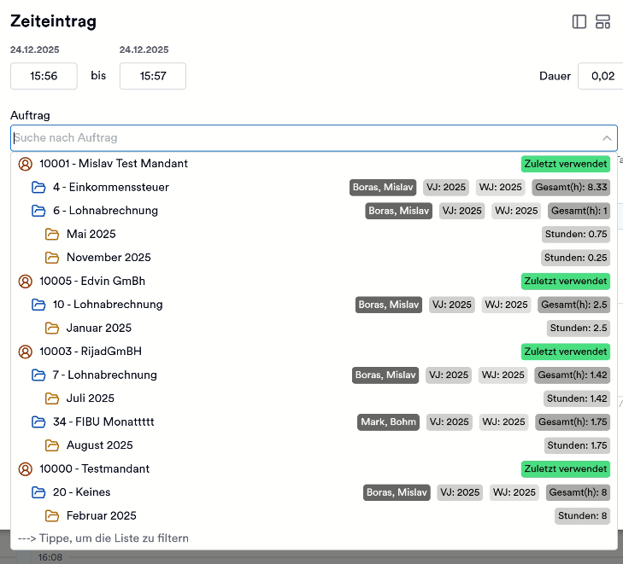
If you need help following the article, feel free to reach out to support@memtime.com.