![memtime-light-2x.png.png]](https://knowledgebase.memtime.com/hs-fs/hubfs/memtime-light-2x.png.png?height=40&name=memtime-light-2x.png.png)
Installation Checklist for Users
This section is intended for users who are installing Memtime for the first time, testing it, or are unable to import data from DATEV.
What You Can Check as a User
-
Verify that the DATEV Connect interface is reachable
-
Clarify whether DATEV is operated locally, via a server, or via DATEV ASP
-
If you do not have access to the terminal server environment settings, forward this article to your IT administration
What To Expect
When running the connection test, an XML response must be displayed in the browser. This confirms that the DATEV Connect interface is reachable and working correctly:
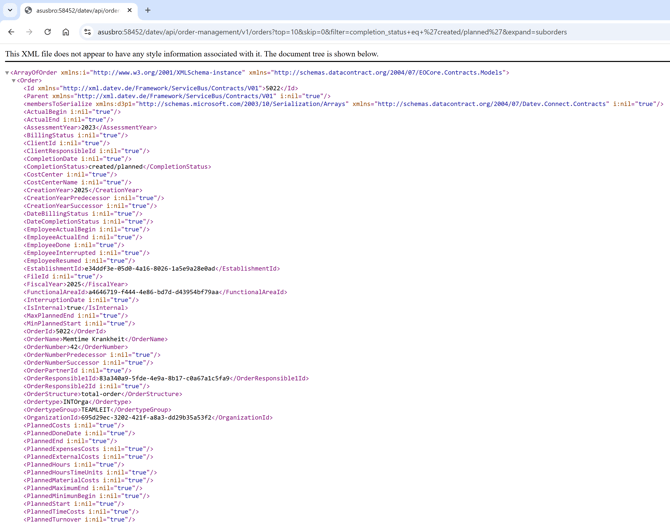
If no XML is shown or an error page appears, the connection test has failed, and the integration will not work.
If you are unsure or do not have access to the settings mentioned here, proceed directly to Part 2 and forward this section to your IT administration.
Technical Check for IT Admins
This section is intended for IT admins who have access to the server or terminal server environment.
Step 1: Check the DATEV Connect Interface URL
Case 1: Standard Address
By default, the DATEV Connect interface is available at the following address:
http://localhost:58454
This address only works if the request is made directly on the server where DATEV is installed.
In most environments, localhost must be replaced with the actual server name or IP address.
In practice, the address may differ, for example:
-
http://servername:58454
-
http://ip-adresse:58454
-
https://servername:58452
The server name must be reachable from the respective terminal server environment.
HTTPS Notes
If the DATEV Connect interface is accessed via HTTPS, the following requirements must be met:
- A valid SIL certificate is installed on the server
- Port 58452 is open
- Access is done via https://<server>:58452
When using self-signed certificates, the browser may display a security warning.
Case 2: DATEV ASP
If DATEV is hosted via a DATEV ASP server, the address always remains:
http://localhost:58454
In this case, localhost must not be replaced.
Step 2: Important Endpoints to Check
All the following checks can be performed directly in a browser or with a tool such as Postman. Access to the Memtime application is not required.
✅ Check user identity
- Purpose: Verifies that the DATEV IAM interface is reachable and that a user is recognized
- Request (triple click to mark the call):
http://localhost:58454/datev/api/iam/v1/Users/me
- Expected result: Returns information about the currently connected user (IAM interface)
✅ Retrieve order overview
- Purpose: Verifies that orders can be read from DATEV
- Request (triple click to mark the call):
http://localhost:58454/datev/api/order-management/v1/orders?top=10&skip=0&filter=completion_status+eq+'created/planned'&expand=suborders
- Expected result: Displays open or planned orders available for import
✅ Test access with a DATEV user
- Purpose: Verifies that the used DATEV user has access to employee data, which is required for importing time entries into Memtime
- Request (triple click to mark the call):
http://localhost:58454/datev/api/master-data/v1/employees?top=1&skip=0
- Expected result: Shows whether the used DATEV user has access to employee data (required for time entries)
For more information on the used DATEV user, please make sure to check this article here:
Next Steps if There Are Issues
If one or more of the endpoints above are not reachable:
- Note the URL used
- Note the error code or error message
And gladly contact us with this information at support@memtime.com.