![memtime-light-2x.png.png]](https://knowledgebase.memtime.com/hs-fs/hubfs/memtime-light-2x.png.png?height=40&name=memtime-light-2x.png.png)
Why Memtime Might Be Blocked
If Memtime has been working with your antivirus tool, but tracking suddenly stops, this could still be caused by the antivirus if Memtime was not whitelisted. Sometimes, an update or change in the antivirus software, not in Memtime, can cause it to flag the app differently.
How to Whitelist Memtime with Your Antivirus Tool
If you are using an external antivirus tool on Windows, there are usually two ways to whitelist Memtime:
1. Whitelisting the Memtime App
If your antivirus tool allows you to whitelist entire applications or programs, you will need to add the Memtime program to your antivirus exclusion list.
This file is called memtime, and it's an application file.
Add this path to your antivirus exclusion list:
C:\Users\Username\AppData\Local\Programs\memtime
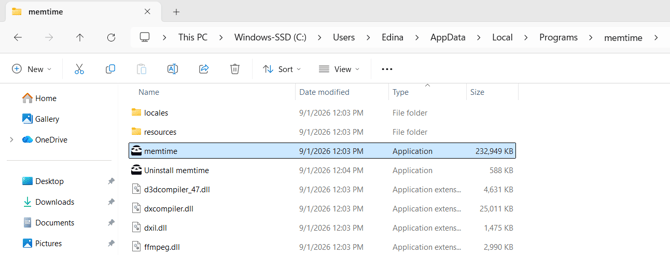
After doing this, Memtime should be allowed to track your activities again once you restart your device, if the tracking core was previously blocked by your antivirus.
2. Whitelisting the Tracking Core
If your Memtime app has stopped tracking activities and your antivirus tool allows whitelisting specific files, you need to whitelist the tracking core of Memtime in your antivirus.
This file is called memtime-core, and it's an application file.
To this, add the following path to your antivirus exclusion list (you might have to open each folder one by one in order to add it to your antivirus):
C:\Users\Username\AppData\Local\memtime\user\core
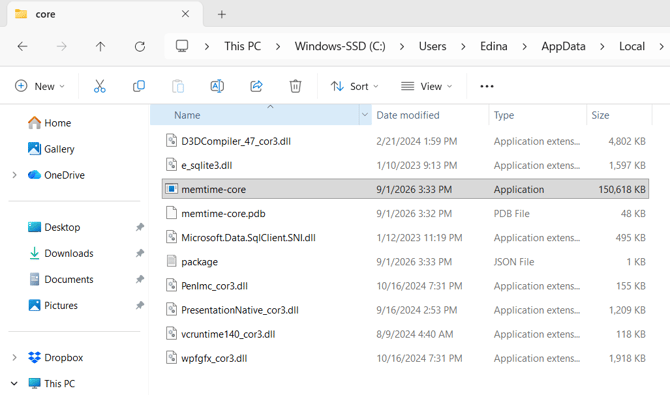
After doing this, Memtime should be allowed to track your activities again once you restart your device, if the tracking core was previously blocked by your antivirus.
Final Steps (mandatory)
After making any of these changes, restart your device to ensure they are applied. Then, check if Memtime can now track your activities as expected.
Support
Need help with the article or have any questions? Reach out to us anytime at: